⚠️ If you read only one thing on this page, read this:
If you click a link in an email and it asks for your Microsoft, email, bank, or other login details (like PayPal, Amazon, payroll, etc.) — stop immediately. Do not enter your credentials!
Phishing emails are those sneaky messages that pretend to be from someone you trust – maybe your bank, a favorite store, or even a colleague. Their goal is to trick you into clicking a malicious link or giving away personal information. We all get them, and they’re everywhere: an estimated 3.4 billion spam emails are sent every day, many of them phishing attempts. But don’t worry – by knowing what to look for, you can outsmart these “phishers” and keep your information safe.
Prefer to watch instead? Here’s a quick video showing how to spot the common warning signs of a phishing email.
Common Signs of a Phishing Email
Most phishing emails share some giveaway signs. Here are common red flags to watch out for:
Suspicious Sender Address: Check the sender’s email. Does the domain name (the part after @) match the real company’s website? Scammers often use addresses that look almost right but aren’t – for example, an email from [email protected] instead of the legitimate @apple.com. Even a one-letter difference or an extra word can signal a fake.
Generic Greetings: Be cautious if an email starts with a vague greeting like “Dear Customer” or “Hi Dear” instead of your actual name. Phishing messages often use generic salutations because they’re sent in bulk. Legitimate companies usually address you by name in their emails.
The Word Kindly: “Kindly update your account below to access incoming messages and to avoid mail malfunction/shutdown.” – Phishing emails often use the word “kindly” in an unnaturally polite command. This example urges immediate action with overly courteous language, which is not how a legitimate company would normally phrase an urgent request.
Urgent or Threatening Language: Phishing emails love to pressure you. Subject lines like “URGENT: Your account will be suspended!” or “Action Required: Unusual login detected!” are designed to make you panic and click quickly. Scammers often claim something terrible will happen if you don’t act immediately. Real companies rarely threaten you or demand instant action via email.
Bad Grammar or Spelling: If an email is full of typos or awkward phrasing, be wary. Professional companies proofread their communications. Mistakes like “Your account are in danger. Click here now to secure.” (yes, actual example from a phishing email) are big red flags. Poor grammar and spelling are common signs that the email isn’t really from who it says.
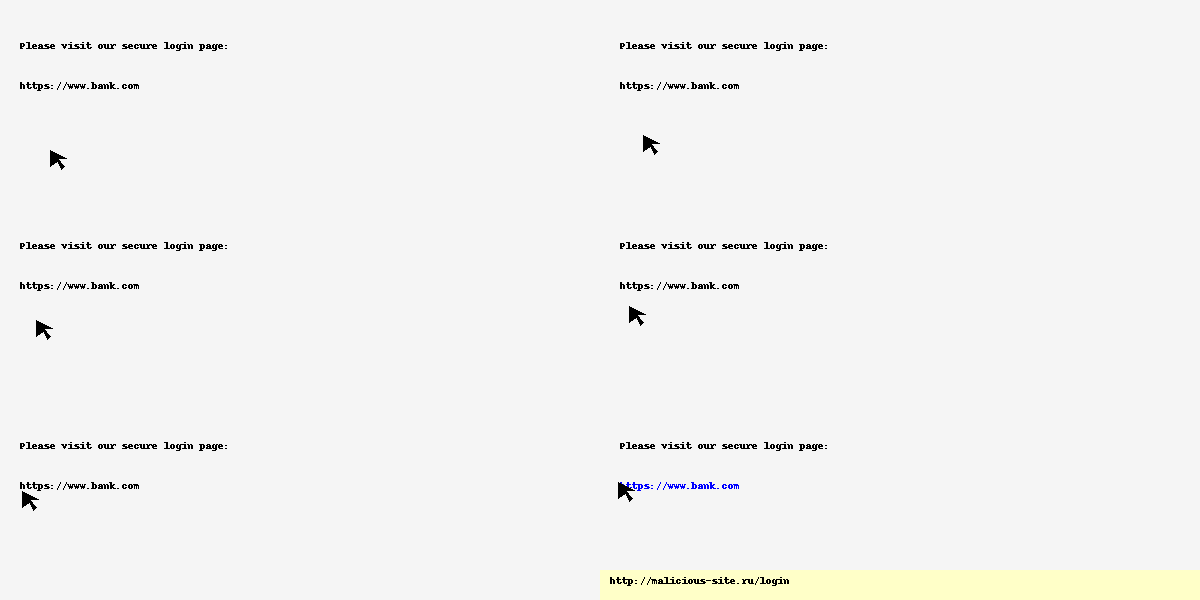
Suspicious Links or Attachments: Never click links or download files without checking them first. Phishing emails often hide malicious links behind official-looking text. For example, a button that says “Reset Password” might secretly point to a suspicious site like http://malicious-redirect.ru/login. You can hover your mouse over a link (or press and hold on mobile) to preview the URL – if it looks weird or doesn’t match the company’s website, don’t click. And be extremely cautious with email attachments you didn’t expect, especially if they’re .zip, .exe, or even .pdf files – they could contain malware.
Requests for Personal Information: Any unsolicited email that asks you to “confirm your password,” “send your Social Security number,” or provide banking details is almost certainly a scam. Legitimate organizations will rarely ask for sensitive personal info over email, especially not out of the blue. And no, your bank isn’t going to email you a link to verify your account or payment details – that’s a phishing classic.
Too-Good-to-Be-True Offers: Phishing scams often dangle bait in the form of amazing offers or scary warnings. Did you “win” a prize in a contest you never entered, or get a coupon for freebies you weren’t expecting? It’s probably a trick – scammers know people let their guard down when a deal looks enticing. As the saying goes, if it sounds too good to be true, it probably is.
Phishing Email Example: Spot the Red Flags
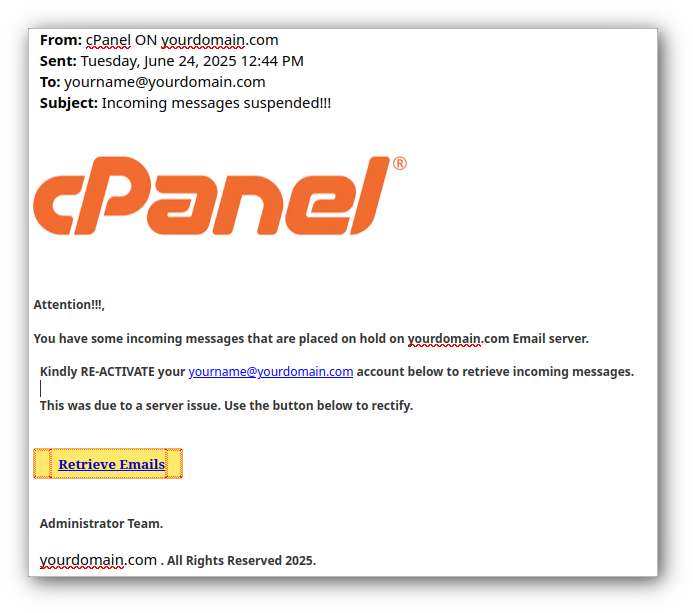
This phishing email pretends to be from cPanel, using their logo and a fabricated urgency in the subject line (“Incoming messages suspended!!!”). Several red flags stand out:
Overly dramatic punctuation – multiple exclamation marks in the subject and greeting.
Unnatural language – phrases like “Kindly RE-ACTIVATE your… account” are common in phishing but sound awkward in legitimate support messages.
Urgency and fear – it claims messages are “on hold” due to a “server issue,” pushing the recipient to act quickly.
Suspicious link – the “Retrieve Emails” button likely leads to a malicious site designed to steal credentials.
Generic sender info – “Administrator Team” instead of a named contact, and the from-address/domain can be spoofed.
Overall, this email uses fake authority, urgency, and polite-yet-commanding language to trick recipients into clicking and entering sensitive login information.
Tips to Protect Yourself
Staying safe from phishing isn’t just about recognizing the signs in the email itself – it’s also about practicing good email habits and using the tools at your disposal. Here are some practical tips and tools to help keep you phishing-proof:
Pause and Verify: If an email tries to scare or rush you, take a deep breath. Don’t click any links right away. Instead, verify the message through a trusted source. For example, if you get an alarming email from “your bank,” open your bank’s official website directly or call their customer service using the number on your card (not a number from the email). Scammers rely on panic to make people act without thinking, so slowing down and double-checking is your first line of defense.
Use Spam Filters and Security Software: Make sure your email’s spam filters are turned on – most email services (like Gmail, Outlook, etc.) will automatically send many phishing attempts to your spam folder. Keep your computer’s security software and antivirus up to date as well, so it can catch known malware or bad attachments. Many email providers also display warnings if an email looks suspicious or comes from an unusual sender. Pay attention to those warnings!
Enable Multi-Factor Authentication (MFA): Whenever possible, turn on MFA for your important accounts (email, social media, banking, etc.). This means you’ll need a second step (like a code on your phone or a fingerprint) to log in, in addition to your password. MFA adds an extra layer of security – even if a scammer somehow steals your password, they still can’t get into your account without that second factor. It’s one of the best protections you can have.
Hover over the mouse pointer over the link before you click: Make sure the link that appears in the status bar (at the bottom of the window) is going to the correct location.
Phishing scammers try to catch you off guard, but now you know what to look for. By checking for the red flags and using the tips above, you can confidently sift the real emails from the phishy ones.
Remember: when in doubt, don’t click! Don’t let the scammers reel you in.
💡 Think you may have been the victim of a phishing scheme?